
I added an llms.txt file to arobis.ai on a Tuesday, told nobody, and watched our analytics for six weeks to see if anything changed. I will tell you exactly what happened later in this guide, because it is not the answer most posts on this topic want to give you.
First, the useful part. If you landed here, you want to actually build one of these files, not read 2,000 words of throat-clearing about "the future of AI search." So here is the plan: what an llms.txt file is, whether each AI engine actually reads it, the exact steps to create one (or skip the manual work with our free llms.txt generator), how to place it on your specific platform, a full annotated example, the mistakes that make people redo it, and how to check if anything is reading it. I run an AI search agency, I have shipped these for real brands, and I am not selling you a plugin, so I can afford to be straight with you.
What an llms.txt file actually is
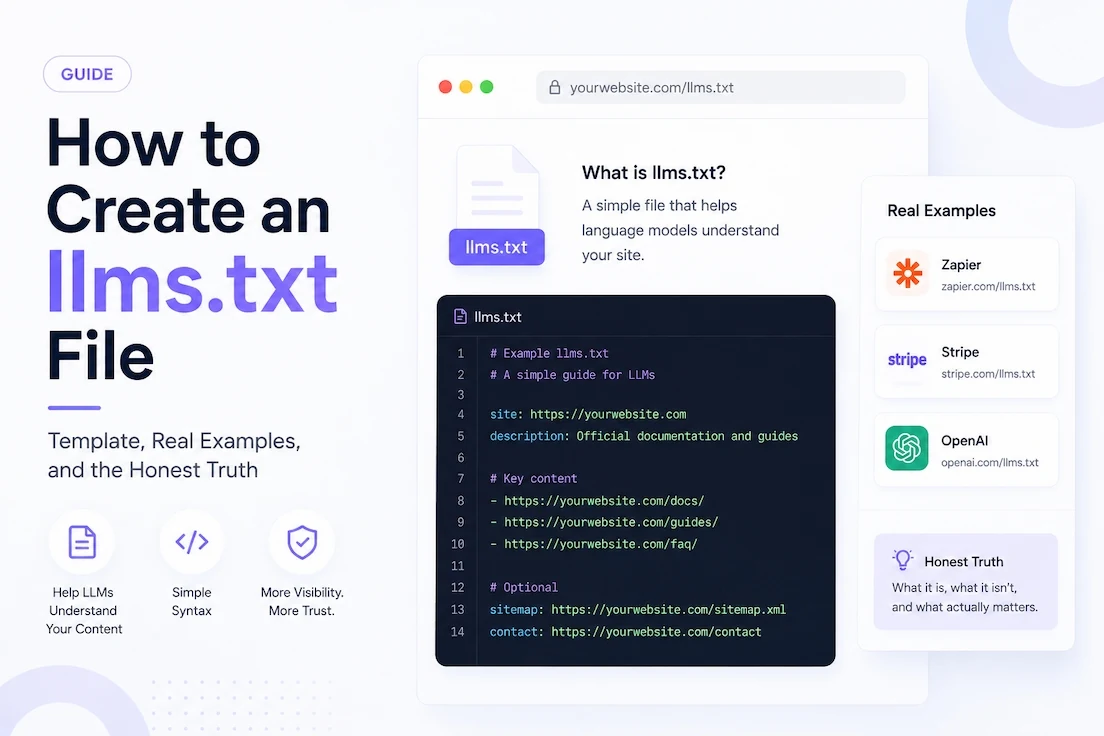
An llms.txt file is a plain-text markdown file you put at the root of your domain, at yoursite.com/llms.txt. Think of it as a clean, curated map of your site written for large language models instead of for Google's crawler. Where a sitemap lists every URL you have, an llms.txt says "here are the pages that actually matter, and here is what each one is about," in language a model can read without wading through your nav, cookie banner, and footer.
The idea was proposed by Jeremy Howard of Answer.AI in late 2024, and the spec lives at llmstxt.org. It is a proposal, not a law, which matters a lot. There is no search engine enforcing it and no ranking bonus attached to it. It is a convention that some AI tools have chosen to support and most have not. If you want the data on how many companies have actually adopted it, we ran the numbers in our llms.txt SaaS adoption study. This guide is about building one yourself and understanding what it will and will not do.
The honest truth first, so you can decide if this is worth your afternoon
Most guides bury this. I am putting it up top because you deserve to spend your time well.
As of 2026, no major AI company has publicly committed to reading llms.txt in production for the purpose of ranking or recommending brands. Google has said flatly that it does not use it, and John Mueller compared it to the old keywords meta tag, which is not a compliment. In one monitoring study of over 500 million AI-bot visits across 90 days, exactly 408 of them targeted an llms.txt file. That is a rounding error. Adoption on the publishing side is low too, around 10 percent of domains in one large sample.
The one real exception is Perplexity, which has said it retrieves the file. And there is a genuine second use case that has nothing to do with marketing: agentic and developer tooling. When someone asks Claude or ChatGPT to "read the Stripe docs and write me the integration," the model can pull a docs site's llms.txt as a table of contents and jump straight to the right pages. That is invisible in crawler stats but very real if you run a docs-heavy or developer-facing product.
Does each AI engine actually read llms.txt? A straight answer per engine
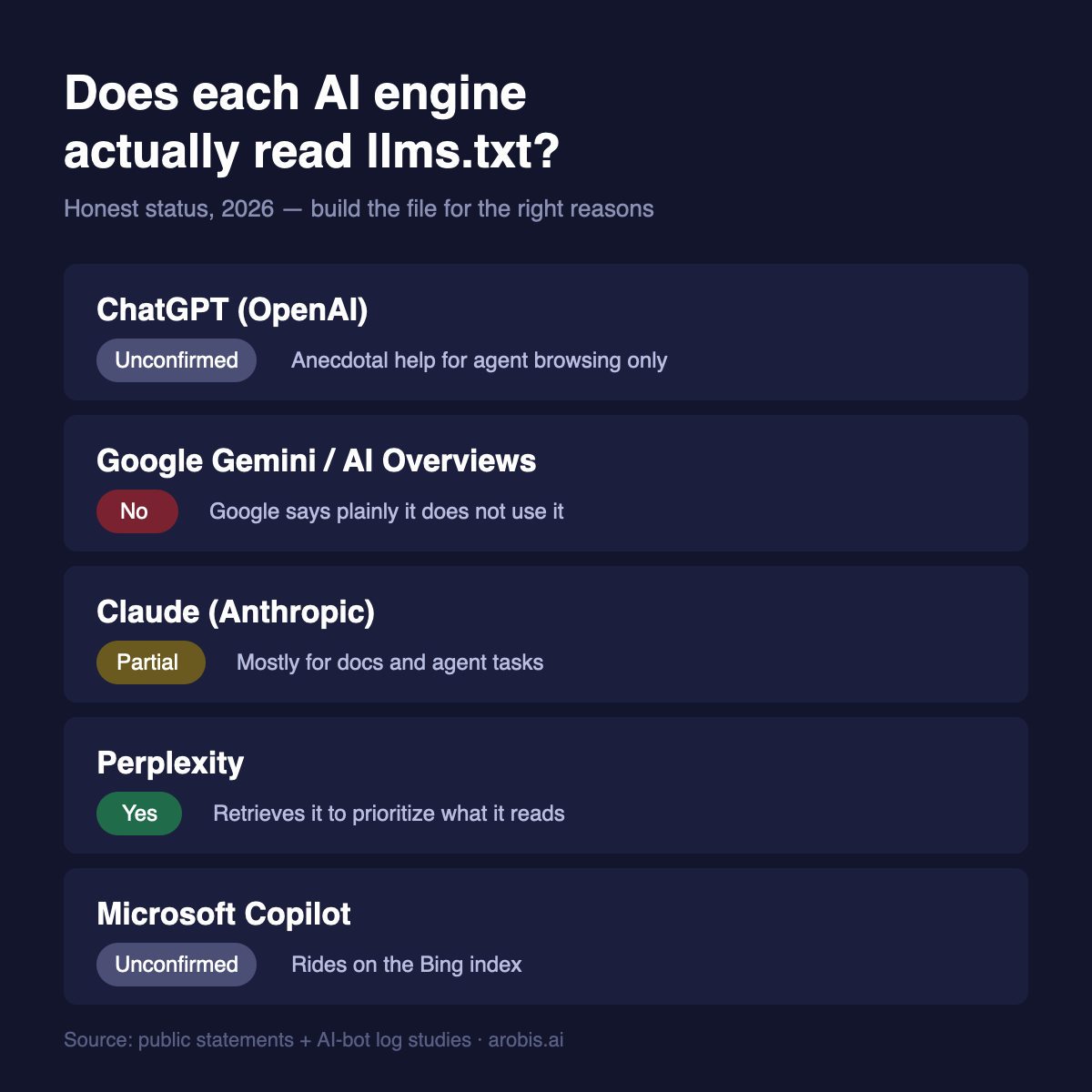
This is the section every other guide is vague about. Here is the honest, current status for each major engine.
ChatGPT (OpenAI)
Not confirmed. OpenAI has not said its crawlers or ChatGPT's browsing use llms.txt to decide what to cite. Some developers report that a clean llms.txt seems to help ChatGPT fetch the right pages during a live browse or an agent task, but that is anecdotal, not an official signal. Do not build one expecting it to change how often ChatGPT recommends your brand. If ChatGPT visibility is your goal, the levers are elsewhere, and we cover them in our guide to ChatGPT SEO tools.
Google Gemini and AI Overviews
No. Google has been unusually direct that it does not support llms.txt and has no plans to. Gemini and AI Overviews lean on Google's existing index and its own systems, so your normal technical SEO and content quality matter far more here. If Gemini is your target, read how to rank in Google Gemini instead of counting on a text file.
Claude (Anthropic)
Partially, and mostly for docs. Anthropic clearly knows the proposal exists, because it publishes its own file at anthropic.com/llms.txt. What is not confirmed is whether Claude's retrieval actively parses third-party llms.txt files when answering general questions. The safe read: helpful for developer and agent use against your docs, unproven for brand recommendations.
Perplexity
Yes, at least partially. Perplexity has said it retrieves llms.txt to help prioritize what it reads. If any single engine justifies building the file on visibility grounds, it is this one, because Perplexity users skew toward research and buying intent.
Microsoft Copilot
Unconfirmed, and it largely rides on Bing's index. Treat it like Gemini: your indexable, well-structured content matters more than a root file. For that engine specifically, see how to rank in Microsoft Copilot.
The pattern is clear. llms.txt is a nice-to-have that helps most with Perplexity and with agentic tooling reading your docs, and does little for the big consumer engines today. Build it for the right reasons.
How to create an llms.txt file, step by step
Step 1: Pick the pages that actually matter
Do not list everything. The whole point is curation. Open a doc and write down the 10 to 30 pages a smart stranger would need to understand your business: your homepage, your core product or feature pages, your pricing, your best documentation, and your two or three strongest articles. If a page would embarrass you as the answer to "what does this company do," leave it off. A tight file of 15 great links beats a bloated one of 80.
Step 2: Write the file in the right structure
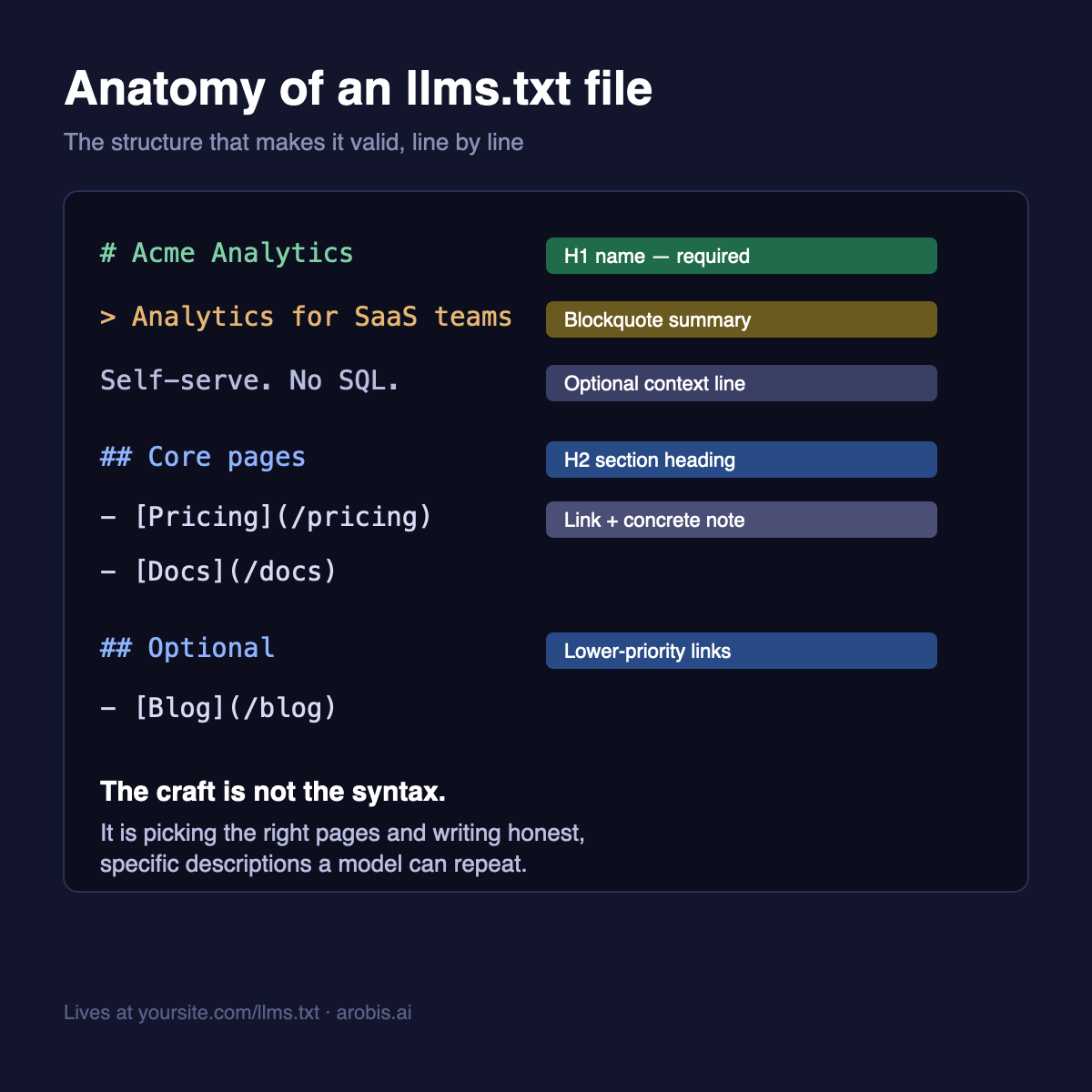
The spec is refreshingly simple. Your file needs, in order:
- An H1 with your site or company name. This is the only truly required line.
- A blockquote summary (a line starting with >) giving a short, plain description of what you do.
- Optional paragraphs with any extra context a model should know, with no fluff.
- One or more H2 sections, each containing a bulleted list of links in the format: a dash, then the link text in brackets, then the URL in parentheses, then an optional colon and a short note.
- An optional final ## Optional section for secondary links a model can skip if it is short on space.
Step 3: Write descriptions a human would actually find useful
This is where most files fail. "Our amazing platform" tells a model nothing. "Pricing: three plans from 29 to 199 dollars a month, billed monthly or annually" tells it something it can repeat. Write each description as if you were briefing a new sales rep in one line: what the page is, who it is for, and the one fact that matters.
Step 4: Save it as llms.txt and put it at your root
Save the file as llms.txt, all lowercase, and host it so it lives at yoursite.com/llms.txt, not in a subfolder. The next section covers exactly how to do this on the common platforms.
Step 5: Add an llms-full.txt if you have real docs
This is optional and mostly for documentation-heavy products. Where llms.txt is the table of contents, llms-full.txt is the whole book: your key content expanded inline in one long markdown file, so an agent can read everything in a single fetch. If you do not have a docs site, skip it.
Step 6: Validate and move on
Open yoursite.com/llms.txt in a browser and make sure it renders as clean text with working links. Run it through any free llms.txt validator to catch formatting slips. Then, and this is the important part, stop fussing with it and go do the work that actually earns AI recommendations.
How to add llms.txt on your specific platform
The hardest part is not writing the file, it is getting it to live at the root. Here is how, per platform.
WordPress
Upload the llms.txt file to your site's root directory via FTP or your host's file manager, the same folder that holds robots.txt. If you cannot reach the file system, a plugin that lets you serve custom root files, or a small function that outputs the file on a rewrite rule, will do it. Confirm it loads at yoursite.com/llms.txt with no theme wrapper around it.
Webflow
Webflow does not let you drop a raw text file at the root, which is the honest catch. The common workarounds are a reverse proxy or an edge worker (for example a Cloudflare Worker in front of your domain) that serves the file at the /llms.txt path, or hosting the file externally and 301-ing the path to it. This is the one step where a developer earns their coffee.
Framer
Framer added support for custom files, so you can add llms.txt through the site's custom-code or file settings depending on your plan. If your plan does not expose it, use the same edge-worker approach as Webflow.
Next.js or Vercel
Easiest of the bunch. Drop llms.txt into your public folder and it is served at the root automatically on deploy. For a dynamic file, add a route that returns the markdown with a text/plain content type.
Shopify
Shopify locks the true root, so a raw /llms.txt is not directly possible on most plans. Serve it through an app or an edge proxy, or accept that this platform is the least friendly to the standard and prioritize the work that actually moves your AI visibility instead.
A copy-paste llms.txt template
Here is a skeleton you can adapt in five minutes. Replace the bracketed parts with your own, keep the markdown symbols exactly as shown.
- # Your Company Name
- > One sentence on what you do and who you do it for.
- A short paragraph of extra context, only if it genuinely helps a model understand you.
- ## Core pages
- - [Homepage](https://yoursite.com/): What the company does at a glance.
- - [Product](https://yoursite.com/product): The main thing you sell and who it is for.
- - [Pricing](https://yoursite.com/pricing): Plans and what each includes.
- ## Documentation
- - [Getting started](https://yoursite.com/docs/start): First steps for new users.
- - [API reference](https://yoursite.com/docs/api): Endpoints and examples.
- ## Optional
- - [Blog](https://yoursite.com/blog): Guides and updates, lower priority.
A full worked example, annotated
Templates are abstract, so here is a complete file for a fictional SaaS called Acme Analytics, with notes on why each line is written the way it is.
- # Acme Analytics
- > Product analytics for B2B SaaS teams who want answers without a data team.
- Acme Analytics is a self-serve product-analytics tool. It is used by product managers and growth teams at software companies. Free tier available, no SQL required.
- ## Core pages
- - [Homepage](https://acme.example/): What Acme does and who it is for.
- - [Product tour](https://acme.example/product): Core features, dashboards, funnels, retention.
- - [Pricing](https://acme.example/pricing): Free tier, then 49 and 149 dollars a month.
- - [Integrations](https://acme.example/integrations): Connects to Segment, Snowflake, and Stripe.
- ## Documentation
- - [Quickstart](https://acme.example/docs/quickstart): Install the SDK and see first data in ten minutes.
- - [API reference](https://acme.example/docs/api): Events, users, and query endpoints.
- ## Optional
- - [Blog](https://acme.example/blog): Product-analytics guides and benchmarks.
Notice what makes it good: the summary names the buyer (B2B SaaS teams), the context line kills the two questions a model would otherwise guess at (does it need SQL, is there a free tier), and every description contains a concrete fact rather than an adjective. That is the whole craft.
Common mistakes that make people redo the file
- Putting it in a subfolder. It must be at the root, yoursite.com/llms.txt, or nothing will look for it.
- Listing every URL you have. That recreates your sitemap and defeats the point. Curate.
- Marketing-speak descriptions. "World-class, best-in-class solution" is noise. Facts only.
- Letting it go stale. If you rename or kill pages, the file rots. Add a quarterly reminder to check it.
- Serving HTML instead of plain text. If your platform wraps it in a template, it is not a valid llms.txt. Confirm it loads as raw markdown.
How to check if anything is actually reading your llms.txt
Do not take it on faith. Two simple checks: first, watch your server or CDN logs for requests to /llms.txt and note the user agents, which will tell you whether Perplexity, GPTBot, ClaudeBot or others are fetching it. Second, run an agent test yourself: ask ChatGPT or Claude to "read yoursite.com/llms.txt and summarize what this company does," and see if it can. If it summarizes cleanly, your file is doing its one reliable job, giving a model a clean read of your site on demand.
llms.txt vs robots.txt vs sitemap.xml, quickly
People mix these up constantly, so here is the clean version. Your robots.txt tells crawlers what they are allowed to access. Your sitemap.xml lists every URL you want indexed, for search engines. Your llms.txt curates and explains your most important pages, for language models. They do different jobs and do not replace each other. Adding llms.txt does not mean you touch the other two.
What actually gets you recommended by ChatGPT (the part that is not a file)
Here is the six-week result I promised. After I added llms.txt to arobis.ai, our AI referral traffic did not measurably change. I expected that, and it is consistent with every serious study out there. A file at your root does not make a model trust you.
What does move AI visibility is unglamorous and slow: being genuinely cited, reviewed and compared across the sources these models already trust, structuring your content so a model can lift a clean answer from it, and earning the kind of third-party mentions that make you the obvious name to drop. We wrote the full method in how to build AI recommendation authority, and if you want to see where your brand stands in AI answers today, run the free AI visibility checker or a deeper AI visibility audit. Add the llms.txt file because it is cheap and tidy. Just do not confuse tidying your house with getting invited to the party. The broader playbook lives in our guides on generative engine optimization and answer engine optimization, the tools are in our best AI visibility tools roundup, and the current landscape is in our state of AI search visibility report.
And if you would rather hand the whole stack to one team, a SaaS SEO agency that ships llms.txt as standard alongside the slower authority work is the practical shortcut.
Checking your server logs for llms.txt requests is a good habit, but it only tells part of the story. For the full setup covering GA4, Search Console, and server log monitoring for AI referral traffic, see our guide on how to track AI traffic to your website.
An llms.txt file is worth an hour of your time, but it is not a measurement tool. To see whether anything changed, monitor what AI engines say about you before and after you publish it.
Frequently asked questions
Does llms.txt help you rank in ChatGPT or Google?
Not in any measurable way as of 2026. Google has publicly said it does not use llms.txt, and there is no confirmation that ChatGPT weights it for third-party sites. Perplexity retrieves it, and it genuinely helps agentic and developer tooling read docs-heavy sites. Treat it as good housekeeping, not a ranking lever.
Where do I put the llms.txt file?
At the root of your domain, so it resolves at yoursite.com/llms.txt, all lowercase. Not in a subfolder. On Next.js or Vercel drop it in the public folder; on WordPress upload it to the root; on Webflow or Shopify you will likely need an edge proxy or redirect.
What is the difference between llms.txt and llms-full.txt?
llms.txt is a short, curated table of contents that links to your key pages. llms-full.txt is a single long file that contains the actual expanded content inline, so an agent can read everything in one fetch. The full version is mostly useful for products with real documentation.
Do I need a developer to create one?
Not to write it. Anyone who can edit text can build a valid llms.txt in under an hour using the template above. You may need a developer only to place the file at your domain root on platforms like Webflow or Shopify that do not allow it directly.
How often should I update my llms.txt?
Review it whenever you launch, rename or retire important pages, and otherwise give it a quick check once a quarter. A stale file that points to dead URLs is worse than no file, because it tells a model something false about you.
Is llms.txt worth doing at all?
For most SaaS and content sites, yes, because it takes about an hour and cannot hurt, and it may help with Perplexity and developer tooling. Just do not expect it to change how often ChatGPT recommends you. The things that actually move AI visibility are citations, authority and clear content, not a file at your root.