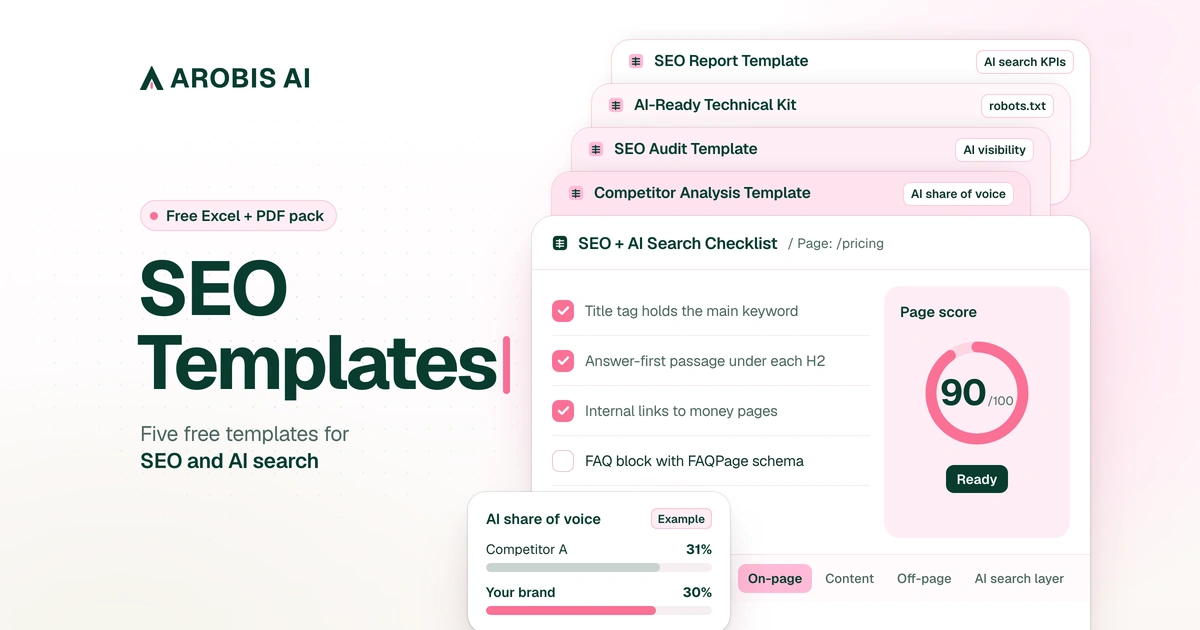
These are SEO templates for B2B SaaS teams, rebuilt for buyers who ask ChatGPT before they ever open Google. There are five: a scored SEO checklist, a competitor analysis template that measures share of AI answers, an SEO audit template with an AI visibility tab, a technical kit with JSON-LD schema and robots.txt files for AI crawlers, and an SEO report template that follows search all the way to demos and deals. Each one is laid out on this page, check by check. Want the files? Get all five free as Excel files that open in Google Sheets, plus PDF.
I'm Ran Yosef, founder of Arobis AI, an AI Search Demand Generation agency for B2B SaaS. Before that I led marketing at five B2B SaaS companies for twelve years, in roles up to CMO and VP Marketing. I built these from the sheets we run on clients every month: the 25 to 50 money prompts we track for each one, the live crawler fetches in our audits and the ledger a report has to pass before it goes out.
Old SEO templates broke when the clicks moved. Pew Research Center followed 900 US adults through 68,879 Google searches and found a click on a regular result in 8% of visits with an AI summary, against 15% without one. Clicks nearly halved, and a template that only counts rankings and clicks misses what now happens on the results page.
What are SEO templates?
SEO templates are ready-made checklists, spreadsheets and report layouts that turn repeat SEO work into a fixed process: the same checks, the same columns and the same scoring every time. A good one now also checks whether AI crawlers can read your pages and whether ChatGPT, Gemini and Perplexity name you.
Google mixes three meanings for this phrase: work templates like these, website themes sold as "SEO friendly", and plugin settings that fill title tags from a pattern.
Classic SEO and AI SEO don't need separate templates. The same pricing page has to rank on Google and get quoted in a ChatGPT answer, so two files means two owners and a gap between them. New to the AI side? Start with answer engine optimization.
The 5 free SEO templates at a glance
Each template covers one monthly job on a B2B SaaS team. Not sure where to begin? Pick by your stage.
- SEO + AI Search Checklist. 72 checks, scored 0 to 100 per page. About 30 minutes a page.
- Competitor Analysis Template: SEO + AI Search Share of Voice. Ten tabs and 25 buyer prompts. About 2 hours.
- SEO Audit Template with an AI Visibility Tab. 48 site checks plus 31 per money page, a 20-prompt AI test and a 90-day plan. About half a day.
- AI-Ready Technical Kit. Ten JSON-LD files, three robots.txt files and a 23-bot crawler matrix. About 1 hour.
- SEO Report Template with AI Search KPIs. Seven sections, from executive summary to method note. About 1 hour a month.
- How to use
- Score
- Technical
- On-page
- Content
- Off-page
- AI search layer
- How to use
- Competitor set
- SEO snapshot
- Prompts
- AI share of voice
- Share of voice
- Citation sources
- Reviews and community
- Content gap
- Positioning notes
- Action list
- How to use
- Scorecard
- Technical
- On-page + content
- Links + authority
- AI visibility
- Page checks
- AI prompt test
- Findings
- Fix list
- 90-day plan
- Homepage graph
- Organization
- WebSite
- SoftwareApplication + Offer
- Product
- FAQPage
- BlogPosting with author
- ProfilePage
- BreadcrumbList
- Review
- robots.txt variants
- AI crawler matrix
- Executive summary
- SEO KPIs
- AI search KPIs
- Engine breakdown
- Wins and losses
- Next month
- Method note
Why I rebuilt every SEO template I used to trust
For most of my career I was the one buying SEO. Every month the agency report went up and to the right. Rankings rose, impressions rose, and pipeline didn't move with them. Nobody was lying. The template measured the wrong end of the funnel, so a good month and a useless month produced the same slide.
91 clicks showed me where the value sits
Our own Search Console, US, last 28 days: 91 clicks. The free AI Visibility Checker took 68 of them. The homepage took 10, blog posts 7 and every other page 6.
One useful tool page beat dozens of long posts. That's why these templates are laid out here instead of hidden behind a teaser.
Ranking isn't being recommended
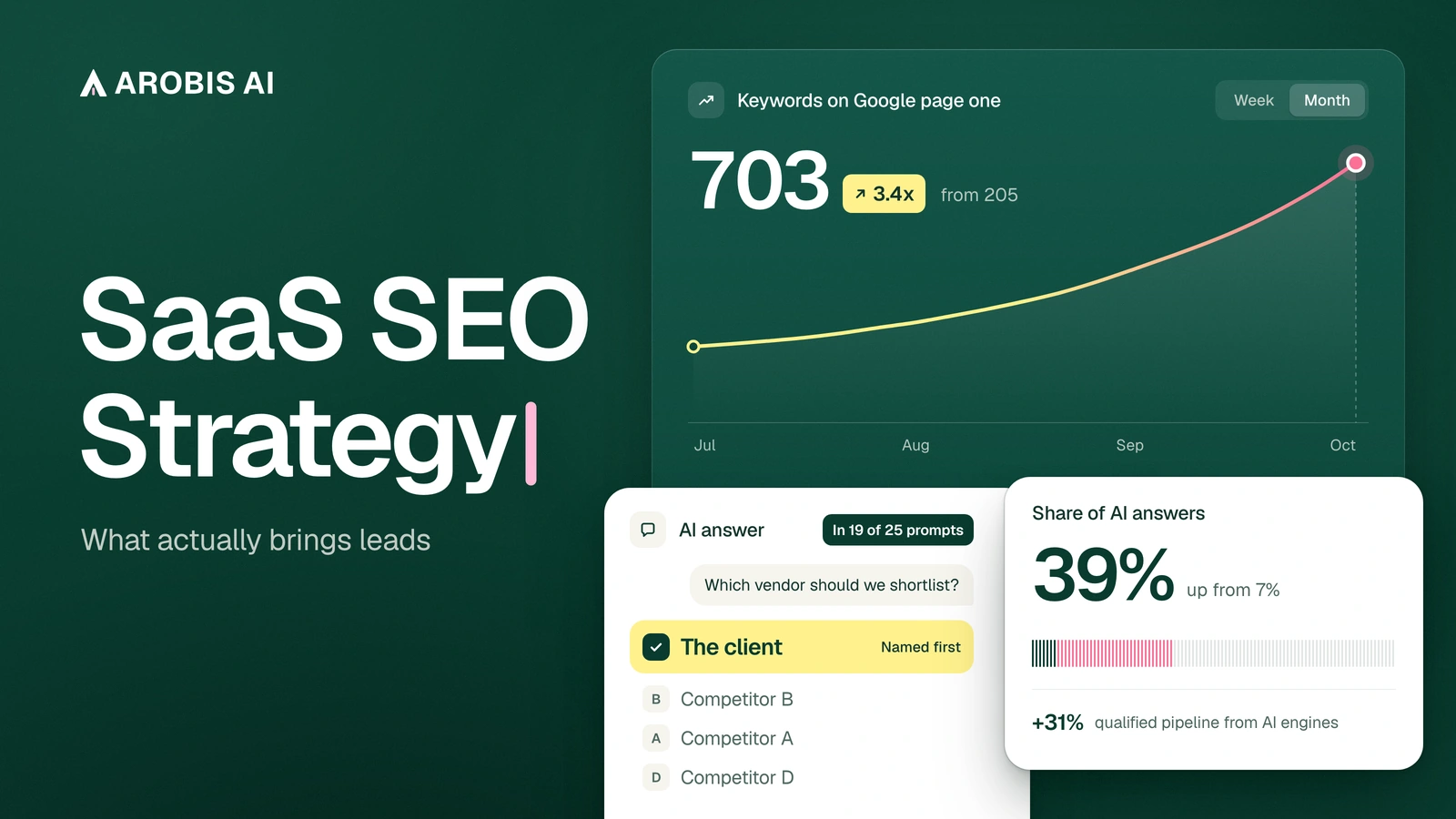
When we started with a B2B SaaS client, it had 205 non-brand keywords in Google's top 10 and showed up in 7% of the AI answers we tracked. Both numbers come from the same starting window. A classic SEO report would have called that account healthy. Its buyers, asking ChatGPT for a shortlist, mostly heard about someone else.
Closing that gap is most of what we do in AI visibility work for B2B SaaS.
Which templates people search for most
The five templates' phrases draw about 8,980 US searches a month (Google Keyword Planner).
We built the pack in demand order. The checklist leads on 2,000 searches a month, and the report comes last.
SEO checklist: 72 checks, scored per page (technical, on-page and AI search)
An SEO checklist is a fixed list of checks you run on a page before it goes live and again after. This one has 72 checks in five groups: technical, on-page, content, off-page and an AI search layer. Each check carries a weight from 1 to 3, and every page gets a score from 0 to 100.
Mark each check Done, Partly, Not yet or N/A. Done earns the full weight, Partly half, Not yet zero, and N/A drops out. The sheet also counts critical gaps (weight-3 checks marked Not yet): fix those first, whatever the score says. Five pages fit side by side. Each gets a Page score from the 31 checks that change page to page, and a Site score from the 41 that are the same for every page, like robots.txt or your G2 profile.
Above is the 12-check short version; all 72 follow.
Three things sit outside the score: Search Console verified, GA4 recording and an empty Manual actions report. Local SEO isn't in the 72 either; if you sell to one region, add it as a sixth group.
My rule: score pages, not sites. A site-level SEO score averages your pricing page with your blog, and the blog has more pages, so it wins the average. The one URL that closes deals can fail half its checks while the site still reads 85. A score per URL makes that impossible to hide.
- Classic SEO checklist phrases2,00092%
- AEO, GEO, AI SEO and LLM SEO checklists1808%
The chart above is why this is one checklist and not two. People who search for an AI checklist still want the SEO checks, with the AI layer built in.
Technical SEO checklist (17 checks)
These decide whether Google, Bing and the AI crawlers can reach, render and index the page. Weight in parentheses.
- T01. Page returns 200 and is indexable (3). "URL is on Google" in URL Inspection.
- T02. Canonical points to itself, and Google agrees (3).
- T03. One host, one protocol, one hop (2). Every http and www variant 301s straight to https.
- T04. Docs, help center and app sit on a clear domain plan (2). Docs indexable, app pages noindex.
- T05. XML sitemap lists only canonical, indexable, 200 URLs (2).
- T06. No money page sits in "Crawled, currently not indexed" (3).
- T07. Core Web Vitals pass on mobile (2). LCP 2.5 s or less, INP 200 ms or less, CLS 0.1 or less.
- T08. Body copy is in the raw HTML, not only drawn by JavaScript (3). Prices and FAQ answers show in view-source.
- T09. Pricing plans are readable text (3). Not an image or a calculator alone.
- T10. No orphan money pages (3). Every money page has 3 or more links from crawlable pages.
- T11. Internal links skip 404s and redirect chains (2).
- T12. Every retired URL has a 301 that is applied and tested (3). One hop, checked with curl.
- T13. robots.txt doesn't block money paths or assets (3). Sitemap line present.
- T14. Changelog and release notes are crawlable (1).
- T15. hreflang is correct, if you have localized pages (1).
- T16. Mobile layout has no sideways scroll (1). Tap targets about 44 px.
- T17. Site verified in Bing Webmaster Tools, money pages indexed in Bing (3). Bing's index sits behind Copilot answers.
On-page SEO checklist (14 checks)
The answer-first checks (O04 and O06) are the core of AEO for SaaS teams, and they cost nothing but a rewrite.
- O01. Title tag leads with the term the page should own (3). Under about 60 characters, brand last.
- O02. One H1 that matches the search intent (2).
- O03. Meta description earns the click (1). 140 to 160 characters, one proof point.
- O04. The first two sentences answer the main question (3). No scene-setting intro.
- O05. H2s use the words buyers actually type (2). Half or more reuse Search Console wording.
- O06. Every section opens with a sentence that makes sense quoted alone (2).
- O07. Three or more contextual links out to related money pages (2). One link per destination.
- O08. Five or more internal links in, with varied anchors (3).
- O09. URL slug is short, readable and stable (1). No dates or IDs.
- O10. Images have alt text, modern formats and set dimensions (1).
- O11. Product screenshots have text captions (1).
- O12. Comparison and pricing tables are HTML, not images (2).
- O13. Open Graph tags set, og:image at 1200 x 630 (1). PNG, JPG or WebP, never AVIF.
- O14. One clear next step that fits the stage (2). Demo low in the funnel, a tool or template higher up.
With one free afternoon, start on internal links (T10, O07 and O08). On one site we audited, 31 of 84 posts had zero internal links. We fixed the links, wrote no new posts, and by day 35 organic sessions were up 128% and MQLs up 24%. The full story is in the internal linking fix on 84 posts.
Content SEO checks (14 checks)
Half of these are about the product and landing pages AI engines quote when a buyer asks about price, fit or security.
- C01. The page owns one primary keyword no other page targets (3).
- C02. A named author with a real bio and LinkedIn (2).
- C03. At least one thing only your company can say (3). An original chart, number, screenshot or workflow.
- C04. Every statistic links to its primary source (2).
- C05. Pricing page answers the buyer's real questions (3). Plans, limits, overage, contract length, trial.
- C06. Fair comparison pages for your top 3 to 5 rivals (3). Sourced rows, and it says where the rival fits better.
- C07. Alternatives pages for your top rivals (2).
- C08. One page per major integration (3). What syncs, which direction, setup steps, limits.
- C09. Use-case and role pages for the people who buy (2).
- C10. Security and trust page answers procurement (3). SOC 2 or ISO status, hosting regions, subprocessors, DPA, SSO.
- C11. Facts, screenshots and prices are still true (2).
- C12. Format matches what already ranks (2).
- C13. FAQ built from real sales objections (2). 4 to 8 questions, 40 to 80 words each.
- C14. Case studies carry numbers and a named role (2).
Off-page SEO checks (10 checks)
These measure who vouches for you where buyers and engines look. Our Reddit for SaaS guide covers doing it without getting banned.
- F01. Money pages earn external links, not just the homepage (2).
- F02. You appear in the "best [category]" lists that rank and get cited (3). Set your own target, track it monthly.
- F03. G2 profile complete and getting fresh reviews (3).
- F04. Capterra, GetApp and Software Advice profiles complete (2).
- F05. Real presence in Reddit and communities (2). Named staff, each community's rules followed.
- F06. Listed in integration marketplaces (2).
- F07. One consistent company description everywhere (2). Your site, LinkedIn, Crunchbase and G2.
- F08. Unlinked brand mentions turned into links (1).
- F09. Anchor text looks natural (1).
- F10. Video demos and how-tos on YouTube with chapters (1).
AI search checks (17 checks)
Can AI engines read you, do they know who you are, and do you see the buyers they send? For the deeper version, run the full AEO checklist next to this one.
- A01. AI search crawlers allowed in robots.txt and at the CDN (3). OAI-SearchBot, Claude-SearchBot, PerplexityBot, Googlebot and Bingbot.
- A02. Training crawlers are a decision, not an accident (2). A written choice that robots.txt matches.
- A03. Server logs show AI bots getting 200s (2). No 403 or 429 on money pages.
- A04. Organization schema with sameAs on the homepage (3). Four or more profiles.
- A05. SoftwareApplication schema on the product or pricing page (2). Prices match the page.
- A06. BlogPosting schema with a real author (2).
- A07. BreadcrumbList on deep pages (1).
- A08. AI engines describe you correctly (3). Right category and ideal customer, no stale facts.
- A09. Money prompts tracked monthly across engines (3). Baseline recorded, same wording every run.
- A10. Your site gets cited, not only your name mentioned (2).
- A11. You're in the third-party pages AI cites for your prompts (3).
- A12. GA4 shows AI visits as their own channel (2).
- A13. AI-sourced leads captured in the CRM (2). A "How did you hear about us?" field plus first-touch source.
- A14. Key facts stated in one quotable sentence each (2). Who it's for, pricing model, top integrations, security status.
- A15. Wrong AI answers logged and fixed at the source (2).
- A16. llms.txt published, as an optional extra (1). Our free llms.txt generator writes one for you.
- A17. Answer pages cover your full prompt set (3). Every money prompt maps to one page that answers it.
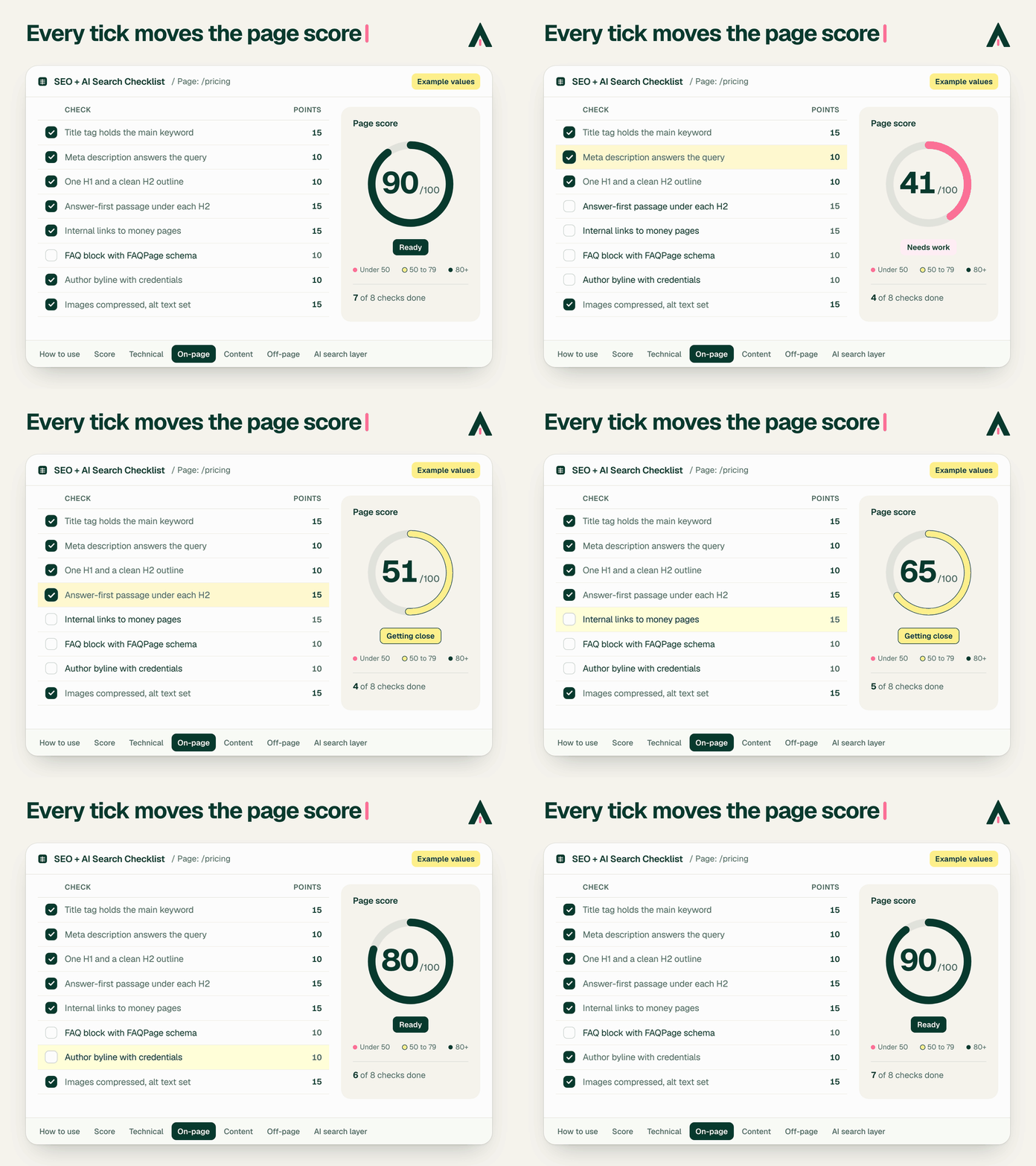
In the sheet, every check also says why it matters, where to look and how to fix it. Get the checklist sheet, and the other four come with it.
Competitor analysis template: SEO and AI share of voice
A competitor analysis template is a sheet that compares you with three to five named rivals on the same measures. This SEO competitor analysis template has ten tabs: competitor set, SEO snapshot, prompts, AI share of voice, share of voice, citation sources, reviews and community, content gap, positioning notes and an action list. AI share of voice is the tab most competitor templates lack.
The 10 tabs
- Competitor set. Up to five rivals from three lists: who you lose deals to, who ranks top 3 for your head term, and who AI names for "best [category]". Each row holds the rival's positioning, main buyer and pricing model.
- SEO snapshot. Domain Rating, referring domains, organic traffic, top-10 keywords and page counts. Free tools cover all but the top-10 keyword count, which needs a paid tool or stays blank.
- Prompts. The 25 buyer prompts, plus three persona variants.
- AI share of voice. The raw grid: each brand's position in each answer.
- Share of voice. The results per brand, by engine and by stage.
- Citation sources. Every URL the engines cite, who it mentions, and whether you can get in.
- Reviews and community. G2 and Capterra ratings, TrustRadius review counts, Reddit threads, videos.
- Content gap. 14 page types marked yes or no for each brand.
- Positioning notes. Twelve fields per rival, from its claim and entry price to who AI says it's best for, a four-line SWOT and your counter-position.
- Action list. Every finding as a task with impact, effort, owner and an automatic priority.
Came for a classic competitor analysis template? Competitor set and Positioning notes are that part. The other eight tabs add rankings, reviews, content gaps and what classic templates leave out: who gets named when a buyer asks an AI engine.
How to measure AI share of voice
AI share of voice is your brand's mentions divided by the mentions of every tracked brand, across the same set of AI answers, the same definition our AI visibility metrics use. The sheet also shows mention rate (answers naming you, divided by all answers), first-place count and average position.
A worked example with the animation's made-up numbers. Across 25 answers there are 54 brand mentions. Competitor A has 17, so 31%. Your brand has 16, so 30%. Competitor B has 14 (26%) and Competitor C has 7 (13%). Your brand appears in 16 of the 25 answers, a 64% mention rate. Two brands can tie on share of voice and be far apart on first-place answers, so the sheet shows both.
The prompt list ships with 25 buyer prompts across nine stages. They're written for an example category, product analytics, so rewrite them in your buyers' words. One per stage, from the Prompts tab ({you} is your brand and {a} your first rival; both fill in from the Competitor set tab):
- Problem. "Why do users sign up for our B2B SaaS trial and never come back?"
- Category. "What is a product analytics platform and when does a B2B SaaS company need one?"
- Best X. "What is the best product analytics platform for a B2B SaaS company with 50 employees?"
- X vs Y. "{you} vs {a} for product analytics: which should we choose?"
- Alternatives. "What are the best alternatives to {a}?"
- Pricing. "How much does {you} cost per month?"
- Integrations. "Which product analytics tools integrate with Salesforce and HubSpot?"
- Security. "Which product analytics platforms are SOC 2 Type II certified and GDPR compliant?"
- Implementation. "How long does it take to implement {you}, and what do customers say about support?"
Our buying-intent prompt library has more starting points. Four rules keep the runs comparable:
- Same wording, every run. Change wording between quarters, never between runs.
- Clean sessions. ChatGPT in a Temporary chat with search on, AI Overviews in incognito, a fresh thread elsewhere.
- Five engines. ChatGPT, Gemini, Perplexity, Google AI Overviews and Copilot. The template leaves Claude out; add it as a sixth if your buyers use it.
- Monthly. Recommendations take 60 to 90 days to shift, so weekly runs mostly measure noise.
Short on time? Start with a free ChatGPT visibility check on 5 buyer prompts.

What it looked like for a real client
For 90 days we tracked the share of AI answers naming a B2B SaaS client. It climbed from 7% to 39%, first of the 16 brands we tracked. The next brand sat at 29%.
Its own site was the most cited source in its category. A fixed competitor set keeps those numbers comparable. Our state of AI search visibility research shows how much the picture shifts when the set changes.
In Ahrefs' study of about 15,000 prompts, only about 8% of the URLs cited by ChatGPT, Gemini and Copilot ranked in Google's top 10 for the same prompt. Perplexity was higher, at 28.6%. That's how a site can hold strong Google rankings and still be missing from most AI answers.
Why I open the citation sources tab first
Most people open the share of voice tab first, because it holds the scoreboard. I open citation sources. Share of voice tells you that a rival is winning. Citations tell you where: the G2 category page, the three listicles and the one Reddit thread every engine keeps quoting. That's a to-do list with names on it, and it's the core of GEO for SaaS. Pitch the top rows first. Our guide to earning more AI citations covers the outreach. ChatGPT is the biggest engine, and getting named in ChatGPT has its own playbook.
Run it monthly, like AI brand monitoring. Twenty-five prompts in five engines is 125 answers to read. When that eats a day, look at tools that automate prompt tracking.
SEO audit template and checklist, with an AI visibility tab
An SEO audit template is a scored workbook for finding what stops a site from ranking and getting cited. This one has 48 site checks in four pillars: technical, on-page and content, links and authority, and AI visibility, plus 31 page checks per money page. Every check has a method, pass, partial and fail thresholds and a weight, and every finding ends as an owned fix.
Pass earns the full weight, Partial half, Fail zero. Each pillar scores 0 to 100, weighted technical 30, on-page and content 25, links and authority 20, AI visibility 25. The thresholds are our house rules for B2B SaaS. Change them and the score follows.
SEO audit checklist: technical (13 checks)
- Money pages indexed. 0 not indexed.
- Indexed pages vs sitemap. Within 10% of each other.
- Sitemap is clean. 0 non-200, noindex or non-canonical URLs.
- Canonical agreement on money pages. All match.
- Single host and protocol. All variants 301 in one hop.
- Core Web Vitals on mobile. All URL groups Good.
- Content readable without JavaScript. Homepage, pricing and an integration page in raw HTML.
- Internal 404s. 0.
- Redirect chains. 0.
- Planned redirects applied. Every planned 301 live and tested. Weight 3, for a reason I'll get to.
- robots.txt leaves money paths and assets open.
- Orphan money pages. 0.
- Bing Webmaster Tools. Site verified, 0 money pages missing from Bing.
SEO audit checklist: on-page and content (12 checks)
- Unique titles, target term first. 10 of 10 money pages.
- One H1 per page.
- Answer-first openings. 18 or more of 20 pages answer in sentence one.
- Keyword cannibalization. No top-20 query split between two pages.
- Pricing page answers buyer questions. All 7 in text.
- Comparison pages for top rivals. 5 of 5, fair and sourced.
- Alternatives pages. 3 of 3.
- Integration pages. 10 of your top 10.
- Security or trust page. Certifications, hosting, DPA and SSO in text.
- Named authors with bios. 10 of 10 posts checked.
- First-party proof on money pages. 8 or more of 10.
- Content decay. No top-20 page down more than 30% in clicks.
SEO audit checklist: links and authority (10 checks)
- Authority vs closest rivals. Within 10 DR of the rival median.
- Referring domains trend. Growing over six months.
- Links reach money pages. 5 or more money pages with an external referring domain.
- Listicle coverage. On 6 or more of the top 10 "best [category]" results.
- G2 profile. Right category, complete, reviews in the last 90 days.
- Capterra and GetApp profile. Complete, with reviews.
- Reddit and community presence.
- Integration marketplace listings. Every platform you integrate with.
- Anchor text profile. Brand and URL anchors lead.
- Consistent company description.
SEO audit checklist: AI visibility (13 checks)
- AI search crawlers allowed. In robots.txt and at the CDN.
- Training crawler decision documented.
- AI bots receive 200s. 30 days of logs, money pages.
- Organization schema with sameAs. Four or more profiles.
- Product schema. Valid SoftwareApplication with offers.
- Article schema with author. BlogPosting with an author Person on 3 of 3 posts checked.
- llms.txt, optional. Current, or a conscious skip.
- AI describes the brand correctly. Right in all 3 engines asked (ChatGPT, Perplexity, Gemini).
- AI mention rate on 20 buyer prompts. Set your own target from the baseline.
- Citation rate. Set your own target from the baseline.
- GA4 AI channel. The default AI Assistant channel, plus a custom AI engines group above Referral for assistants GA4 doesn't recognize.
- AI-sourced leads in the CRM. Self-reported and first-touch source both stored.
- Snippet controls. No nosnippet, max-snippet:0 or data-nosnippet on a money-page answer.
How the AI visibility tab works
The tab runs 20 buyer prompts in five engines, three times each, on three days in the same week: 300 runs. A run counts as Yes when your brand is named and as Cited when it links to your domain. Mention rate is runs naming you divided by runs completed, per prompt, per engine and overall. Three runs matter because two runs of the same prompt can name different vendors.
The two prompt checks have no fixed pass line on purpose. Nobody knows your category's normal in advance, and a template that prints one is guessing. Your first run is the baseline for every audit after it.
SEO audit example: what a real finding looks like
Here's a made-up audit, scored the way the template scores it: Technical 72, On-page and content 53, Links and authority 68, AI visibility 48. Weighted 30, 25, 20 and 25, that makes an overall score of 60. AI visibility costs the most points, so its P1 fixes go to the top of the fix list.
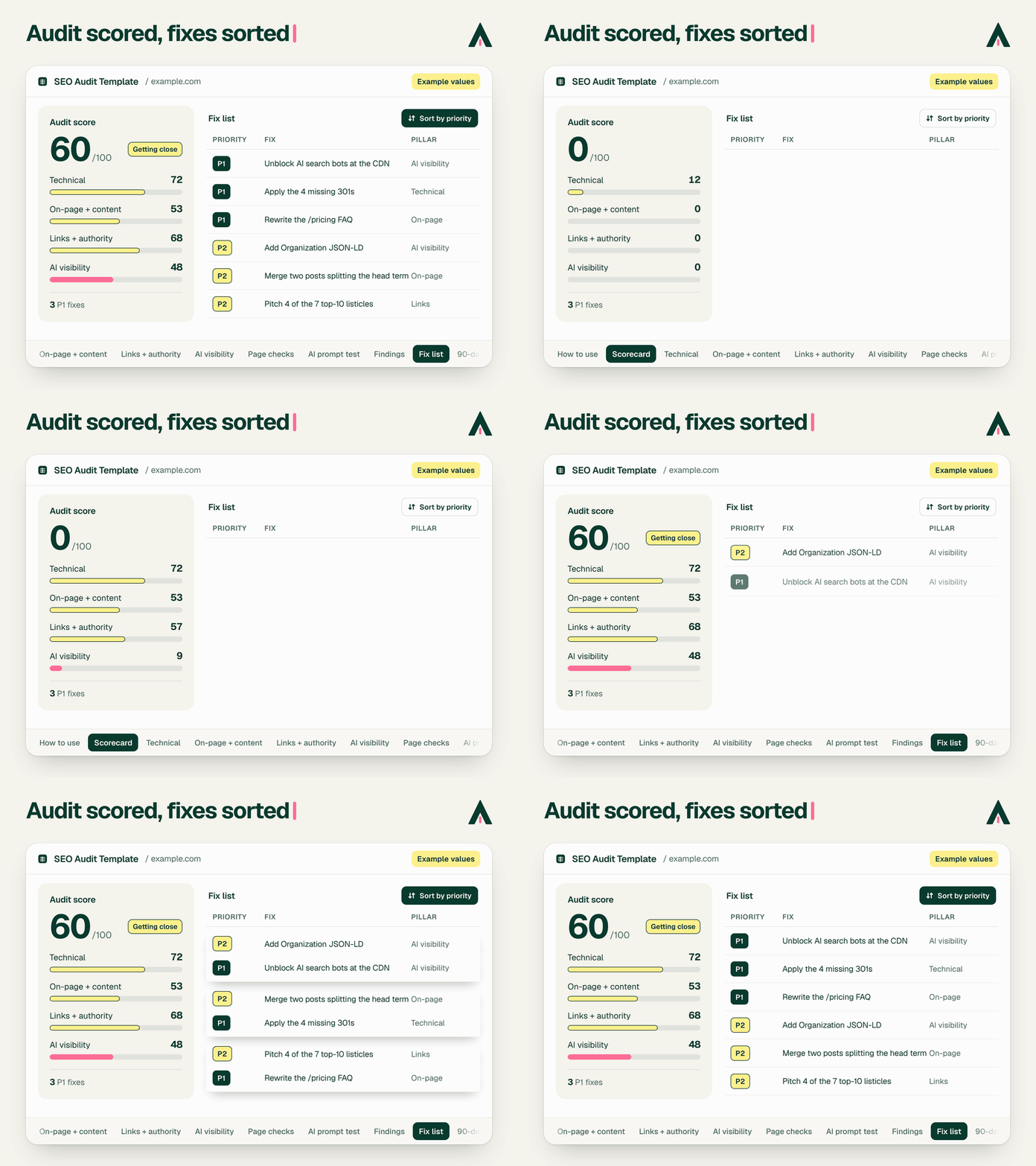
A common finding in our scan data is easy to miss. robots.txt allows the AI bots, the team believes it's fine, and the firewall or CDN blocks them anyway. Search Console shows nothing.
In the Arobis AI Readiness Report, built from 2,997 website scans, only 3.8% of sites disallow GPTBot in robots.txt. Yet 18.6% returned no usable page to ChatGPT on a live fetch. Among sites whose robots.txt allows OpenAI's crawlers, 17.2% still blocked GPTBot when it knocked: 480 of 2,787.
The audit asks for server logs for that reason. In the sample Findings tab the row reads "OAI-SearchBot and PerplexityBot get 403 from the CDN", and the Fix list makes it a P1 for the web lead, due in week 2.
SEO audit report template: findings, fix list and a 90-day plan
A 60-page findings PDF that nobody owns changes nothing, so this template doesn't stop at findings. Every Fail and Partial goes on the Findings tab with its evidence. The Fix list turns each one into a task with a priority (P1 means this month), an owner, a due date, the test that proves it's done, and Applied and Verified dates. The 90-day plan sets the order:
- Month 1: baseline and fix. The 20-prompt baseline first, then every P1 fixed, GA4 and CRM tracking live.
- Month 2: build the answer pages. Comparison, alternatives, integration and trust pages.
- Month 3: earn mentions and re-measure. Pitch the most-cited third-party pages, then run the prompt test and the audit again.
A shorter version lives on LinkedIn as my 25-point AI visibility audit checklist, and Google AI Mode cites it for "AI visibility audit template". This sheet is the full version: get the audit template.
I still run every AI Visibility Audit myself. If you'd rather hand it over, the AI Visibility Audit starts with a free Basic report of 2 to 3 pages within 24 hours. The $399 Full audit runs 40 buyer prompts on ChatGPT, Gemini, Claude and Perplexity.
Structured data examples and a robots.txt for AI crawlers
Structured data examples are ready-made JSON-LD blocks that tell Google and AI engines what a page is: the company, its product, its plans and who wrote it. This kit has ten for a SaaS site, plus three robots.txt files for AI crawlers that set which bots may fetch your pages for search and which for training.
Structured data examples (JSON-LD) for a SaaS site
Most structured data examples online show one type at a time, for a bakery or a recipe. A SaaS site needs a connected graph: Organization, WebSite and SoftwareApplication, linked by @id so engines read them as one entity. Below are short versions of three kit files with example values: the homepage graph, the pricing page's SoftwareApplication and a BreadcrumbList. Before you paste any of it, check what AI crawlers actually read.
<script type="application/ld+json">
{
  "@context": "https://schema.org",
  "@graph": [
    {
      "@type": "Organization",
      "@id": "https://www.example.com/#organization",
      "name": "Example Analytics",
      "url": "https://www.example.com/",
      "logo": "https://www.example.com/images/logo-512.png",
      "description": "Example Analytics is a product analytics platform for B2B SaaS teams that runs directly on your data warehouse.",
      "sameAs": [
        "https://www.linkedin.com/company/example-analytics",
        "https://www.crunchbase.com/organization/example-analytics",
        "https://www.g2.com/products/example-analytics/reviews",
        "https://www.youtube.com/@exampleanalytics"
      ]
    },
    {
      "@type": "WebSite",
      "@id": "https://www.example.com/#website",
      "name": "Example Analytics",
      "url": "https://www.example.com/",
      "publisher": {
        "@id": "https://www.example.com/#organization"
      }
    },
    {
      "@type": "SoftwareApplication",
      "@id": "https://www.example.com/#software",
      "name": "Example Analytics",
      "url": "https://www.example.com/product",
      "applicationCategory": "BusinessApplication",
      "operatingSystem": "Web browser",
      "publisher": {
        "@id": "https://www.example.com/#organization"
      }
    }
  ]
}
</script><script type="application/ld+json">
{
"@context": "https://schema.org",
"@type": "SoftwareApplication",
"@id": "https://www.example.com/#software",
"name": "Example Analytics",
"url": "https://www.example.com/product",
"applicationCategory": "BusinessApplication",
"operatingSystem": "Web browser",
"publisher": {
"@id": "https://www.example.com/#organization"
},
"offers": [
{
"@type": "Offer",
"name": "Free",
"price": "0",
"priceCurrency": "USD",
"url": "https://www.example.com/pricing"
},
{
"@type": "Offer",
"name": "Growth",
"price": "499",
"priceCurrency": "USD",
"url": "https://www.example.com/pricing",
"priceSpecification": {
"@type": "UnitPriceSpecification",
"price": "499",
"priceCurrency": "USD",
"unitText": "month",
"billingDuration": "P1M"
}
}
],
"aggregateRating": {
"@type": "AggregateRating",
"ratingValue": "4.6",
"bestRating": "5",
"ratingCount": "128"
}
}
</script><script type="application/ld+json">
{
"@context": "https://schema.org",
"@type": "BreadcrumbList",
"itemListElement": [
{
"@type": "ListItem",
"position": 1,
"name": "Home",
"item": "https://www.example.com/"
},
{
"@type": "ListItem",
"position": 2,
"name": "Integrations",
"item": "https://www.example.com/integrations"
},
{
"@type": "ListItem",
"position": 3,
"name": "Salesforce",
"item": "https://www.example.com/integrations/salesforce"
}
]
}
</script>The full kit has ten copy-paste files for an example SaaS company:
- Organization. With sameAs to your real profiles.
- WebSite. No SearchAction, since Google no longer shows the sitelinks search box.
- SoftwareApplication with Offer. Every plan and price, matching the pricing page.
- Product. For fixed-price add-ons.
- FAQPage. Only for a visible FAQ, word for word.
- BlogPosting with author. Author as a Person with sameAs.
- ProfilePage. The author page, sharing the Person @id with BlogPosting.
- BreadcrumbList. Matching the visible breadcrumb.
- Review. Of the product, shown on the page, never of your own company.
- Homepage graph. Organization, WebSite and SoftwareApplication in one script tag.
A page map covers 11 page types. Pricing gets SoftwareApplication, plus FAQPage if a FAQ is visible. Comparison pages get BreadcrumbList and never a rival's ratings. Google says AI Overviews need no special schema (what Google says matters for AI Overviews). Treat markup as a way to make your facts unambiguous to machines. It won't lift a ranking by itself.
Robots.txt examples: three versions
A robots.txt for AI crawlers names each AI bot and says what it may fetch. The key split is search versus training: OAI-SearchBot, Claude-SearchBot and PerplexityBot fetch pages for AI answers, while GPTBot and ClaudeBot collect training data and CCBot builds the open archive many training sets come from. You can allow the first group and block the second.
# AI search engines and assistants: welcome
User-agent: OAI-SearchBot
User-agent: ChatGPT-User
User-agent: Claude-SearchBot
User-agent: Claude-User
User-agent: PerplexityBot
User-agent: Perplexity-User
Allow: /

# Everyone else, training bots included
User-agent: *
Allow: /

Sitemap: https://www.example.com/sitemap.xml# AI search engines and assistants: welcome
User-agent: OAI-SearchBot
User-agent: ChatGPT-User
User-agent: Claude-SearchBot
User-agent: Claude-User
User-agent: PerplexityBot
User-agent: Perplexity-User
Allow: /
# Model training: no thanks
User-agent: GPTBot
User-agent: ClaudeBot
User-agent: Google-Extended
User-agent: Applebot-Extended
User-agent: CCBot
User-agent: meta-externalagent
User-agent: Amazonbot
User-agent: MistralAI-Training
Disallow: /
User-agent: *
Allow: /
# Bing honors an AI-training group from Feb 1, 2027 (Google: early 2027).
# Add when ready: User-agent: __usage_ai-training then Disallow: /
Sitemap: https://www.example.com/sitemap.xml# Major AI crawlers and assistants: stay out
User-agent: OAI-SearchBot
User-agent: ChatGPT-User
User-agent: GPTBot
User-agent: Claude-SearchBot
User-agent: Claude-User
User-agent: ClaudeBot
User-agent: PerplexityBot
User-agent: Perplexity-User
User-agent: Google-Extended
User-agent: Applebot-Extended
User-agent: CCBot
User-agent: meta-externalagent
User-agent: meta-externalfetcher
User-agent: Amzn-SearchBot
User-agent: Amzn-User
User-agent: Amazonbot
User-agent: DuckAssistBot
User-agent: MistralAI-Index
User-agent: MistralAI-User
User-agent: MistralAI-Training
Disallow: /
# Classic search engines stay open
User-agent: *
Allow: /
# Bing honors an AI-training group from Feb 1, 2027 (Google: early 2027).
# Add when ready: User-agent: __usage_ai-training then Disallow: /
Sitemap: https://www.example.com/sitemap.xml# Private paths: closed to every bot
User-agent: *
Disallow: /app/
Disallow: /api/
Disallow: /admin/
Disallow: /login
# A named group ignores the * group,
# so it repeats the private paths
User-agent: OAI-SearchBot
User-agent: ChatGPT-User
User-agent: Claude-SearchBot
User-agent: Claude-User
User-agent: PerplexityBot
User-agent: Perplexity-User
Disallow: /app/
Disallow: /api/
Disallow: /admin/
Disallow: /login
Sitemap: https://www.example.com/sitemap.xml- Allow AI search. Every AI search bot and assistant is welcome, and training bots fall under the catch-all and stay open. My default for B2B SaaS.
- Search, no training. AI search bots open, training crawlers blocked, Google-Extended included (see below).
- Block all AI. The major AI search, assistant and training agents blocked, classic search open. Only for sites that sell the content itself.
One trap matters for SaaS. The kit files repeat your private paths (/app/, /api/, /admin/, /login) inside every named group, because a crawler that matches a named group ignores the catch-all. Name ClaudeBot with only "Allow: /" and you've opened your login path to it.
The kit's crawler matrix covers 23 user agents: set Allow or Block per bot and it builds your file.
Which AI crawler does what
- OAI-SearchBot (OpenAI). Indexes pages for ChatGPT search. OpenAI says sites that opt out won't be shown in ChatGPT search answers, except as navigational links, and changes take about 24 hours. More on ranking in ChatGPT.
- ChatGPT-User and GPTBot (OpenAI). ChatGPT-User visits a page when a ChatGPT user's request needs it, and OpenAI says robots.txt rules may not apply to it. GPTBot collects training data.
- Claude-SearchBot, Claude-User and ClaudeBot (Anthropic). Search, user fetches and training. Anthropic's three crawlers mirror OpenAI's split.
- PerplexityBot and Perplexity-User. PerplexityBot surfaces and links sites in Perplexity search, and Perplexity says it isn't used for foundation model training. Perplexity-User generally ignores robots.txt. See how PerplexityBot and Perplexity-User differ.
- Google-Extended. A control token, not a crawler. It decides whether Google may use your pages to train Gemini models, and it also covers grounding in Gemini Apps, which the kit's "Search, no training" file blocks. Google Search, AI Overviews and AI Mode run on Googlebot, so it doesn't touch them. Open it again if Gemini answers matter to your buyers. More on Google-Extended and Gemini.
- Applebot-Extended and CCBot. Apple's training token and Common Crawl's open archive. Blocking Applebot-Extended leaves you in Siri, Spotlight and Safari.
- Meta, Amazon, DuckDuckGo and Mistral. meta-externalagent crawls for AI training and Meta products, and meta-externalfetcher may bypass robots.txt. Amzn-SearchBot feeds search in Amazon products such as Alexa, and Amazonbot may train Amazon models. DuckAssistBot and MistralAI-Index feed AI answers, and both vendors say they don't train on what they fetch.
Cloudflare found that over the 12 months to July 2025, 80% of AI crawling was for training, 18% for search and 2% for user actions. In July 2025 Anthropic made about 38,066 crawl requests for every referral it sent back, OpenAI about 1,091 and Perplexity about 195. Training is most of the crawling, and almost none of it sends anyone back.

What AI bots actually get from your site
In the same readiness data, GPTBot received a full page on 80.8% of sites, against 93.5% for Googlebot. Firewalls, bot protection and JavaScript-only pages make up the difference. After every robots.txt change, check your CDN's bot settings and custom firewall rules too. Next to robots.txt in the root folder sits llms.txt, and our guide to creating an llms.txt file takes you through it.
What changes next in robots.txt
Bing has announced an AI training preference set by a robots.txt group named __usage_ai-training, honored from February 1, 2027. Google's crawler documentation says it intends to support the same group in early 2027. For those two, one group then covers AI training without naming their bots. Other vendors still need their own named groups.
SEO report template (with a filled-in example)
An SEO report template is a fixed monthly layout for showing what search did for the business. This one has seven sections: executive summary, SEO KPIs, AI search KPIs, engine breakdown, wins and losses, next month's plan and a method note. It ends at pipeline: demos, qualified leads and closed deals by source, not traffic and rank alone.
Monthly SEO report template: the 7 sections
- Executive summary. What moved, why, and what it did for pipeline. For the board version, see taking AI share to the board.
- SEO KPIs. Thirteen rows, from Google and Bing clicks, links and technical health to organic demos and pipeline.
- AI search KPIs. Nine rows, from mention rate to AI-sourced pipeline, for 22 KPIs in all.
- Engine breakdown. Mention rate by tested engine, AI-referred sessions by GA4 source.
- Wins and losses. Pages and prompts that moved, with the reason. Four flags: positions 11 to 20 with 100+ impressions, CTR under half the norm for its position, money pages down 20% in clicks, core prompts that dropped you.
- Next month's plan. Pulled from the fix list, with owners.
- Method note. Prompt count, engines, runs, the noise threshold and any tracking change.

The data lives in a spreadsheet, and the monthly report comes as PowerPoint and PDF. To see the AI section filled in, open a filled-in AI visibility report.
Why Search Console clicks never match GA4 sessions
Search Console counts clicks on Google results. GA4 counts sessions that loaded its tag, after consent banners and ad blockers take their share, and its Organic Search channel mixes in Bing and other engines. Search Console labels days in Pacific Time, GA4 in your property's time zone. Show both, labeled, and compare the trend lines.
AI search KPIs that belong in a monthly SEO report
The template has a row for each.
- Search Console Generative AI report. Impressions in Google's AI features by page, country and device. No clicks, no queries.
- Bing Webmaster Tools AI Performance report. Counts AI citations from Copilot, AI summaries in Bing and select partners. Setup is in our guide to Bing's AI Performance report.
- Machine-written queries in Search Console. In our own Search Console, queries submitted by AI tools averaged 20.6 words, and 178 of them produced 9,819 impressions and zero clicks in three months. Report them as their own row. The filter is in machine-style queries in Search Console.
- GA4 AI Assistant channel. Since May 13, 2026, GA4 puts recognized AI assistant visits in their own channel. AI Overviews and AI Mode stay in Organic Search. Our guide to tracking AI traffic in GA4 has the setup.
- Branded impressions. Rising branded searches with flat AI referrals usually means engines recommend you and buyers come back through Google.
- Your prompt panel. Mention rate and citation share from the audit, share of voice from the competitor template.
Pew found people clicked a link inside an AI summary on 1% of visits to pages with one. So most of what an AI answer does for you never shows up as a visit, and the report counts mentions as well as sessions. Our prompt counts and run rules are on how we measure AI visibility.
SEO report example: one B2B SaaS client, 90 days
The filled-in example, with real numbers from the same B2B SaaS client:
- Non-brand keywords in Google's top 10: 205 in July, 416 in September, 703 in October (3.4x).
- Non-brand keywords in Google's top 3: 45, then 85, then 145 (3.2x).
- Google clicks, 28 days: 2,030 to 2,330 (+15%). Impressions 82.2K to 101K (+23%).
- Google AI Overview and AI Mode impressions: 6.3x.
- Share of tracked AI answers: 7% to 39%.
- AI engine visits per month: 66 in August, 60 in September, 146 in October.
- Conversions from those visits: 3, 2, then 22.
- From the client's CRM: +31% qualified pipeline from AI engines and +11% closed-won deals sourced from AI engines.
Look at September. Visits dipped from 66 to 60 and conversions from 3 to 2. A one-month report would have flagged a bad month. October brought 146 visits and 22 conversions. That's why the template shows AI rows as a three-month trend.
Want this layout with your numbers? Get the report template.
The lead source row most reports miss
Over 23 days of lead tracking for that client, Google and Bing organic brought 52 form fills and ChatGPT brought 14. That looks like a strong AI channel. Then we read the forms. Of the 52 organic fills, 8 were buyer demo requests from 8 companies. Of the 14 ChatGPT fills, 11 were not buyers.
So the template counts demos, meaning demo or trial requests, by source instead of raw form fills. Counted as fills, both channels looked several times bigger than their demo counts, and budget moves on a number that never becomes revenue.
Which template to start with
Start with the template that answers the question you can't answer today. Your stage decides it. Search volume doesn't.
- No SEO program yet. Checklist on your 10 most important pages, then the technical kit, with a report baseline from day one. For the plan around it, read SaaS SEO strategy.
- Ranking, but rarely named by AI. Competitor template, then the audit. The citation sources tab shows where the shortlist gets made.
- Reporting to a CEO or board. Report template first, then backfill the data.
If you fill in only one, make it the report, even with no SEO program yet. A baseline you didn't record is a result you can never prove. If you'd rather hire a SaaS SEO agency to run them, our pricing page shows what a done-for-you program costs.
Three more templates people ask for
None of them is in the pack, so here is what each needs. An AI-ready content brief needs eight lines:
- Primary term. One no other page targets.
- The buyer prompt it answers. In the buyer's own words.
- The first two sentences. Written out, answering that prompt.
- H2s. Taken from Search Console and People Also Ask wording.
- The one fact only you can state. A number, a test or a screenshot.
- Schema type. From the kit's page map.
- Three internal links in. From pages that already get traffic.
- Next step. One action for the reader.
A keyword research sheet needs seven columns: term, monthly volume, intent, the page that owns it, the AI prompt version of the term, current rank, and whether AI engines name you for it.
An SEO proposal needs six parts: the problem in the prospect's own numbers, the baseline, the 90-day plan, the KPIs you'll report, price and term, and what the client provides (access, an owner, a review slot).
The mistake no template catches on its own
A template tells you what to fix. It can't make sure the fix happened, and I learned that the expensive way.
We were replacing an old page with a new one for a B2B services company. The 301 from the old URL was written down, agreed, and never applied. For weeks both pages sat live, competing for the same searches. Then the searches around that topic fell from position 11.5 to 95. I caught it in a review. Google didn't do that to us. We wrote a plan and didn't finish it.
Now every planned action on a client account sits in a ledger: what, owner, due date, applied, verified. An automated check runs on every item it can test, redirects included. No report goes out until the ledger passes, and a failed item freezes new work on that account. That's why the audit weights "planned redirects applied" at 3 and has you curl every old URL to prove it. It's also part of how a monthly engagement runs with us.
Get the 5 free SEO templates
Every check, formula and snippet on this page is yours to use as is. The files save the typing: Excel that opens in Google Sheets, a PowerPoint report and a PDF of each, with sample data shaded butter yellow until you clear it.
Download the pack
Five Excel files that open in Google Sheets, a PowerPoint report deck, the technical kit and a PDF of each. The pack PDF downloads the moment you submit.
The download form loads here. If you don't see it, go to the form.
By getting the templates you agree to our Privacy Policy.
Frequently asked questions
Do these SEO templates work in Google Sheets?
Yes. Each spreadsheet is an Excel file that opens in Google Sheets: open Sheets, choose File, then Import, and upload it. The report deck is PowerPoint and opens in Google Slides.
What does an SEO audit include?
This template groups an SEO audit into four pillars: technical health, on-page and content, links and authority, and AI visibility, from crawler access to how AI describes you. Every Fail or Partial ends as an owned fix with a priority and a due date. All 48 site checks are listed above.
How often should you do an SEO audit?
I run a full SEO audit once a quarter and a buyer prompt run every month. AI recommendations on core buyer prompts usually take 60 to 90 days to shift, so a quarterly audit measures real change while the monthly run spots a rival moving in early.
How long should an SEO report be?
One page for leadership: non-brand clicks, AI mention rate, AI-sourced demos, pipeline from search and the one decision you need. If a number doesn't lead to a decision or a task, cut it. The pack covers four report types: the Dashboard for leadership, Wins and losses for rankings, the audit's Technical tab for technical health, and the deck for clients, with a logo slot.
Should I block GPTBot?
For most B2B SaaS sites, no. GPTBot is OpenAI's training crawler, while ChatGPT search runs on OAI-SearchBot, so blocking GPTBot alone doesn't remove you from ChatGPT search answers. Only 3.8% of sites in our readiness scans disallow it. I allow it because I want the next model to know what my clients sell. If your content is the product, the math flips.
Does FAQ schema still work?
Not for rich results. Google stopped showing FAQ rich results in Search from May 7, 2026 and removed the documentation on June 15, 2026. The FAQPage markup is still valid schema.org and keeps your answers machine-readable at almost no cost. My view: keep it only where a real, visible FAQ matches it word for word.
Is robots.txt necessary?
Not strictly. Without one, crawlers assume everything is allowed. You need it to keep bots out of private paths such as /app/ and /login, to point crawlers to your sitemap, and to separate AI search bots from training bots. Then check your logs: robots.txt is a request, not a lock.
Thanks. Your templates are ready:
Download the full pack (PDF)That didn't go through. Please try again in a moment. Every check and example is also on this page, free to copy.